On this page:
Menu  Item
Menu  Item.Shortcut
Menu  Item.default_  shortcut_  prefix

image

class

class gui.MenuItem():

  implements MenuChildView

  constructor (

   label :: ObsOrValue.of(View.LabelString),

   ~action: action :: () -> ~any = values,

   ~enable: enable :: ObsOrValue.of(Boolean) = #true,

   ~help: help_text :: ObsOrValue.of(maybe(View.LabelString)) = #false,

   ~shortcut: shortcut :: ObsOrValue.of(maybe(MenuItem.Shortcut))

                = #false

  )

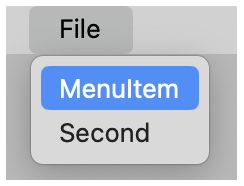
Creates a menu item for including in a menu. The ~action function is called when a user selects the menu item.

See View.LabelString for information about keyboard mnemonics in label. A mnemonic for navigating among menu items is distinct from a menu item’s keyboard shortcut.

If shortcut is not #false, the menu item has a shortcut key combination. See MenuItem.Shortcut for more information.

If help_test is not #false, the item has a help string. This string may be used to display help information to the user.

The MenuItem.Shortcut annotation recognizes a menu-item shortcut key combination in one of the following forms:

  • a Char;

  • a KeyEvent.Key; or

  • a list of modifier symbols ending with a Char or KeyEvent.Key. The following modifier symbols are allowed:

    • #'alt (Windows and Unix only)

    • #'cmd (Mac OS only)

    • #'meta (Unix only, and not combined with #'alt)

    • #'ctl

    • #'shift

    • #'option (Mac OS only)

The MenuItem.default_shortcut_prefix function returns the list of modifier symbols that is added for the current platform when just a Char or KeyEvent.Key is provided for a shortcut.